


Canvas Parent
4.31.25K Reviews
App Specs
- Version
- 4.14.0
- Updated On
- License
- Free
- Downloads
- 500,000+
- Developer
- Instructure
- Categories
- Education
- Platform
- Android
Screenshots
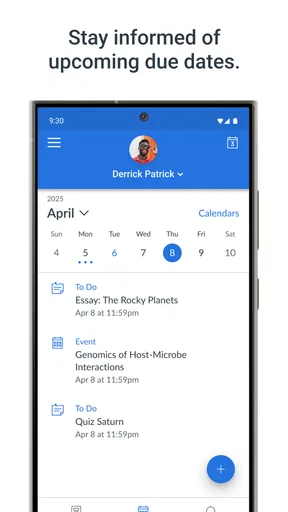
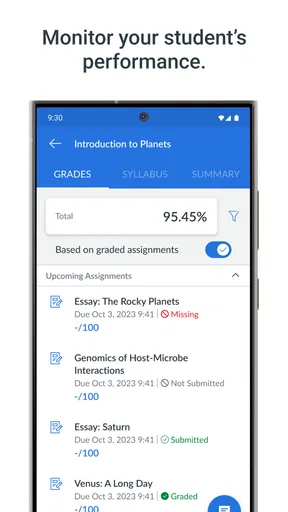
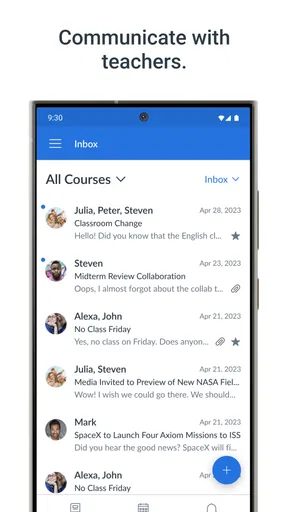
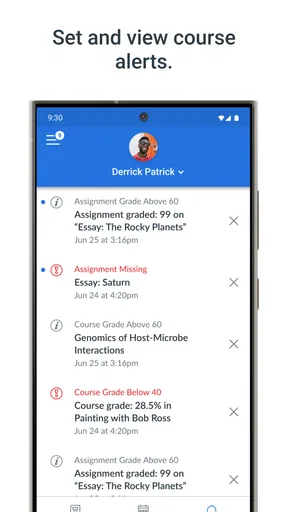
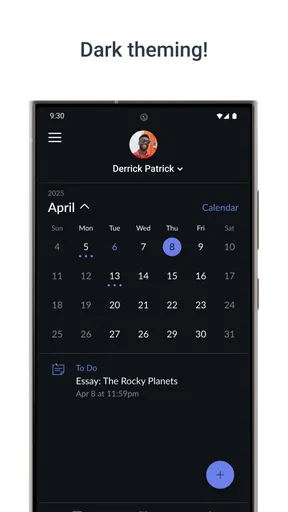
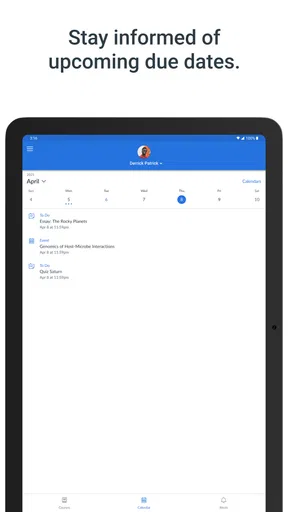
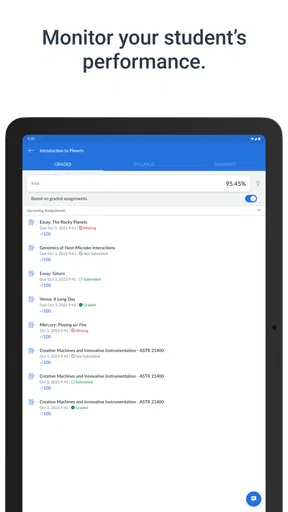
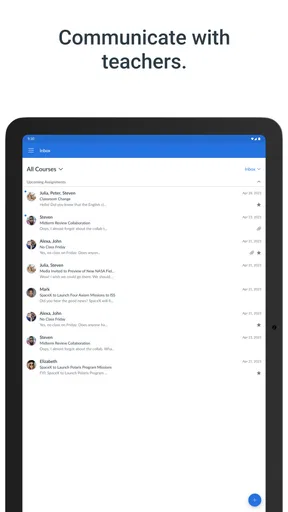
 Analysis by AppCompare
Canvas Parent is the kind of education app that makes sense when a child’s school already uses Canvas and a parent wants a clearer view of what is happening. I used it as a companion rather than as a replacement for the student’s own school account, and that distinction matters. It is designed to give families a quick look at school activity, not to turn a phone into a complete classroom.
Developed by Instructure, this free Education app has a simple purpose: help parents stay aware of their child’s learning without needing to ask for every update. Its average rating sits at 4.3 from around 4,600 ratings, and it has passed 500,000 installs. Those figures suggest that it has found a practical place in many school routines, although its usefulness depends heavily on how actively a school and its teachers use Canvas.
How Canvas Parent feels to use in everyday school life
I find the everyday value of Canvas Parent is less about checking every detail and more about getting a useful first read on a child’s school activity. That quick orientation can help me decide whether to ask a question, make time for a conversation, or simply leave the student to handle their work. The next section looks at how that overview fits into an ordinary family routine.
A readable overview instead of a pile of school messages
The strongest part of Canvas Parent is the idea of an at-a-glance overview. Rather than searching through email threads, classroom websites, paper notices, and separate teacher messages, I can open one place to check the general shape of a child’s schoolwork. That is especially helpful on busy mornings, when I want to know whether there is something important to discuss before the school day begins.
The navigation is built around the child’s school activity, so it feels more focused than a full student learning environment. I do not have to move through every classroom tool just to get a sense of what deserves attention. For a parent who finds school technology confusing, that narrower purpose is welcome. It reduces the number of decisions needed before reaching useful information.
There is also a benefit for families managing more than one child. Switching attention between children is easier when the parent view is separated from the student workflow. I would still check carefully after connecting an account, because a quiet screen does not necessarily mean that no work exists; it may reflect how a particular course or teacher publishes information.
The most useful habit is to treat the app as a daily signal, not as the entire school record. I would use it for a quick check, then open the relevant school material or speak with the child when something needs context. That prevents a parent from overreacting to a single missing item or assuming that every classroom update appears in exactly the same way.
Worth Reading Before You Choose

EA SPORTS FC Mobile 26 Is a Bigger Football Game, but It Takes Time

Flipboard Shows What News Apps Must Do Beyond the Feed

Switching to Android Auto Means Rethinking Your Driving Routine

Google Calendar Makes a Crowded Week Easier to Manage

Ludo King Makes the Most of the Minutes Between Plans

Baby Panda World Brings Quick Play to Modern Phones, but Its Game Library Feels Busy
Why the parent perspective matters
Many learning platforms are designed first for students and teachers. That can leave parents looking at screens full of course tools, assignment controls, and terminology that are not meant for them. Canvas Parent takes a different approach by presenting school visibility from the family side. In my experience, that makes it easier to participate without accidentally taking over the student’s account.
This separation can also support a healthier routine. A parent can ask, “Do you need help with anything due soon?” instead of opening every task and managing the work personally. The app works best when it starts a conversation rather than becoming a second classroom where the adult checks every move.
That said, the app cannot create information that the school has not entered into Canvas. If a teacher relies on another communication method, the parent may still need email, a school portal, or direct contact. Canvas Parent is therefore most effective in schools that use Canvas consistently across classes.
Readability for different users and attention levels
For parents with limited time, a compact overview is easier to process than a long stream of notifications. I can scan the important areas first and decide whether deeper investigation is necessary. This is useful for someone balancing work, childcare, or several children’s schedules.
It can also help parents who are less confident with digital systems. The app’s focused role gives them a more approachable entry point than asking them to learn every part of a student learning management system. Still, familiarity with the school’s own terms remains important. A parent may understand where to look but still need the teacher or school to explain what a particular status means.
For users who need larger text, stronger contrast, screen-reading support, or other device-level adjustments, the practical experience will depend on the phone and operating system as well as the app’s interface. I would test the screens with the accessibility settings already used on the device before relying on it for time-sensitive school information. The app should be judged in that real combination, not in isolation.
Motor and sensory considerations
A parent app has an advantage when it reduces the number of taps needed to reach an update. Canvas Parent is less demanding than navigating a complete student workspace, which may help people who find dense menus or repeated gestures tiring. A short check can be done while standing at a bus stop, during a lunch break, or between household tasks.
However, quick access is not the same as effortless access for everyone. Small touch targets, busy screens, unexpected movement, or tightly packed information can be difficult for users with motor or visual needs. I would recommend using the phone’s text enlargement, display scaling, voice control, or screen reader settings where appropriate, then checking whether important labels remain understandable.
Sensory comfort also varies. Some parents prefer to avoid frequent alerts and only inspect an app at planned times. Others need a prompt because they are supporting a child with a deadline. The better approach is to build a routine that suits the household instead of allowing school technology to interrupt every moment. Canvas Parent can support that routine, but it does not replace the need to manage attention and notifications thoughtfully.
One practical tip is to make the check predictable: for example, review the child’s school view after dinner, then use the result to plan the next morning. This is less stressful than repeatedly opening the app whenever a worry appears. It also makes it easier to notice patterns, such as several tasks arriving together, without turning every individual item into an emergency.
Situational access when the day does not go to plan
The app is most valuable in ordinary moments when a parent needs a fast orientation. Imagine a child returning home unsure whether anything is due the next day. Instead of searching through a backpack and several message threads, I can check Canvas Parent, identify the relevant course activity, and ask a more specific question. That saves time while leaving the child responsible for explaining and completing the work.
It can also help when a parent is away from home. A quick school check may make it possible to arrange a reminder, prepare materials, or alert another caregiver. This is one of the more practical reasons to use a dedicated parent view: it keeps school awareness available without requiring the adult to sit beside the child at a computer.
For families sharing care responsibilities, the app may provide a common reference point, but it should not be treated as a substitute for direct communication. One caregiver might see an update while another has already received a teacher message elsewhere. The app is useful for reducing uncertainty, yet important decisions still deserve confirmation from the school or student.
Its value is more limited during outages, weak connectivity, or school systems that publish information irregularly. I would not rely on it as the only place to find a last-minute change to transport, an urgent announcement, or a complete explanation of an assignment. Keeping the school’s usual communication channels available remains sensible.
What it does better than the usual alternatives
Compared with relying only on email, Canvas Parent offers a more organized school-focused view. Email can be useful for direct messages, but it often mixes teacher notes with unrelated household and work communication. A parent dashboard gives school activity a clearer home.
Compared with opening the full Canvas student experience, the parent app is less intimidating and less likely to expose controls that a parent does not need. That makes it a better fit for visibility and routine check-ins. The trade-off is that a parent may need the student’s view, a browser, or another school channel for detailed work, submissions, discussions, or actions that belong to the learner.
Compared with a general calendar, Canvas Parent has more connection to the school’s own learning activity. A calendar can help organize family life, but it depends on someone entering and maintaining every deadline. Canvas Parent can be more convenient when the school’s Canvas courses are kept current. If a school uses several unrelated platforms, though, a general calendar or school portal may provide a broader combined picture.
Remaining barriers and points of friction
The biggest limitation is not necessarily the app itself; it is the quality and consistency of the information flowing into it. A parent may install the app, connect to the right school, and still find the experience uneven if some teachers post regularly while others use different systems. That can create false reassurance or unnecessary confusion.
Another barrier is interpretation. Seeing an assignment, status, or course item is not always enough to understand what the child needs to do. Parents who are unfamiliar with the school’s grading language may need additional explanation. I would avoid treating a single screen as a final judgment about effort or progress.
There is also a boundary between helpful involvement and over-monitoring. Because the app makes school activity easy to check, it can tempt adults to inspect constantly. For older children especially, the best use may be a scheduled review and an open conversation, rather than surveillance. The app supports visibility, but good family communication determines whether that visibility feels supportive.
Users should also remember that the app is intended for Everyone, yet “suitable for everyone” does not mean every family will find the interface equally comfortable. Parents with cognitive, visual, hearing, or motor needs should test their own device settings and decide whether the information is presented in a workable form. If it is not, the school should know, because an alternative communication route may be necessary.
Who should use it, and who may prefer something else
I would recommend Canvas Parent to a parent whose child’s school already depends on Canvas and who wants a low-effort way to stay informed. It is especially useful for families that need a quick overview, caregivers who cannot sit at a computer during the day, and adults who want to support schoolwork without operating the student account.
I would be more cautious for a family whose school uses Canvas only occasionally. In that situation, the app may feel empty or incomplete, and the school’s main portal, messaging system, or email routine could be more reliable. It is also not the right choice if you expect a complete replacement for teacher communication or a tool that lets a parent manage every part of a child’s coursework.
On iOS, the app requires at least version 9 of the operating system, which keeps it available to some older devices. Its current version is 4.14.0. I would still check the phone’s available system updates and the school’s login instructions before setting it up, particularly if the device belongs to a child or is shared among family members.
My inclusive verdict after using the parent view
Canvas Parent succeeds when its role is understood clearly: it is a family-facing window into Canvas, not a universal school communication center. I like the way that focus can make school information less intimidating and easier to fit into a busy day. The app’s strongest contribution is reducing the distance between what happens in class and what a parent can reasonably follow at home.
Its inclusive value comes from that simplicity, but simplicity has limits. Different abilities, devices, school practices, and family routines will shape the experience. A compact overview may be liberating for one parent and too limited for another. Someone who needs detailed explanations, fully unified school communication, or a different interaction style may need additional tools and direct support from the school.
In the end, I see Canvas Parent as a useful companion for families already living inside the Canvas ecosystem. It is free, made by Instructure, and has earned a 4.3 average from around 4,600 ratings, with roughly 1,200 written reviews. Those numbers are encouraging, but the deciding factor is local: whether your child’s teachers keep Canvas current and whether the app’s presentation works for your household.
I would install it for a clearer daily check, use it alongside the school’s other channels, and keep the child involved in interpreting what appears. Used that way, it can make school support more manageable without pretending to solve every access or communication problem.
Pros
- Quickly view grades
- attendance
- assignments
- and school announcements.
- Push notifications help parents stay updated on important school activity.
- Supports communication between families and teachers in one place.
- Simple dashboard makes essential student information easy to find.
- Available on both Android and iOS devices.
Cons
- Features depend on the school’s Canvas setup and enabled integrations.
- Some updates may arrive late if teachers or schools post information slowly.
- Multiple children can make the dashboard feel crowded to navigate.
- Requires an active school-provided Canvas account to access most features.
- Notification settings may need manual adjustment to avoid too many alerts.
FAQs for Canvas Parent
What is Canvas Parent, and who is it designed for?
Canvas Parent is a companion app for parents and guardians whose children use Canvas at school. After connecting to a student’s Canvas account, parents can review course information, assignment deadlines, grades, announcements, and selected learning activity from a mobile device. The exact features available depend on the school’s Canvas setup and the access permissions assigned to the parent account.
How do I connect Canvas Parent to my child’s Canvas account?
To use Canvas Parent, you generally need to select your child’s school or Canvas institution, sign in or create a parent account, and link it with a student pairing code. The pairing code is normally generated from the student’s Canvas account or supplied by the school. If the institution has enabled a different login method, you may need instructions from the school’s Canvas administrator.
Can I see my child’s grades, assignments, and upcoming deadlines?
Yes, Canvas Parent is primarily intended to help families monitor academic progress. Depending on the courses and permissions configured by the school, you can view assignment details, due dates, grades, course announcements, calendars, and sometimes submission status. Canvas Parent does not replace the student’s full Canvas account, so certain files, discussions, or course tools may only be available through the regular student interface.
Does Canvas Parent send notifications about school activity?
Canvas Parent can provide notifications for important events such as upcoming assignments, newly posted announcements, grade changes, or course activity, but the available notification types depend on the school and the settings selected in the app. After installation, review the notification preferences carefully and allow mobile notifications if you want timely reminders. Notification timing may also vary according to the teacher’s posting habits.
Is Canvas Parent free and safe to use?
Canvas Parent is generally available as a free mobile companion application, although access requires a participating school or institution that uses Canvas. The app handles education-related information, so parents should download it only from the official Google Play Store or Apple App Store and use the correct school login. Protect your password, avoid sharing pairing codes unnecessarily, and contact the school if you notice account or privacy concerns.


